← Kage Lab

Step-by-step guide & SOP recorder

Guides that keep up when the software changes.

Record a task in your browser once and FlowHop turns every click into a clear step with a screenshot. When the system changes, update every guide in minutes – and send your team a 30-second video of what changed.

Add to Chrome – it's free Add to Microsoft Edge No account. Guides stay on your computer. Firefox and Opera versions are in review.

New here? Start with the welcome pack

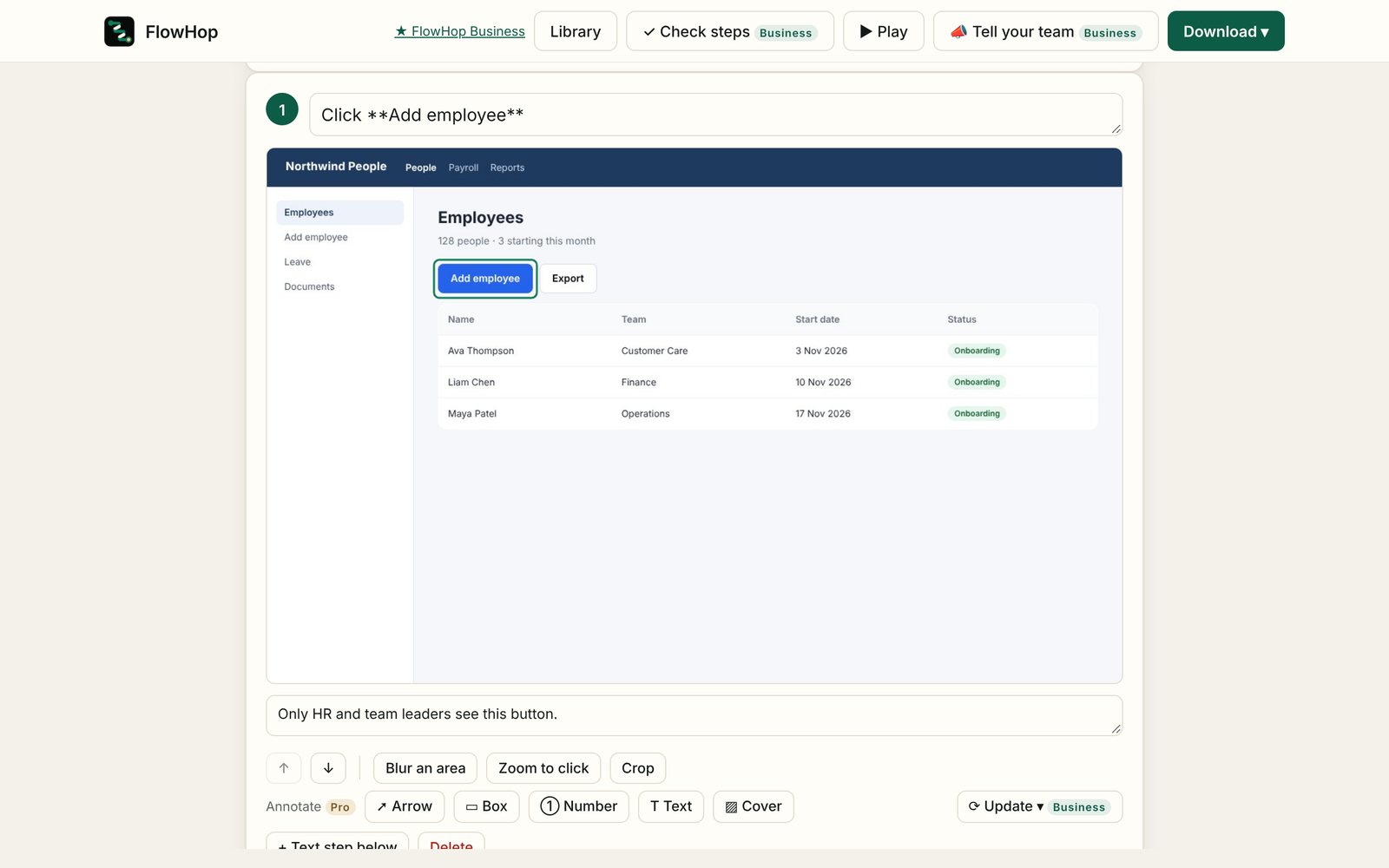
The FlowHop editor showing a recorded guide with a screenshot for each step

Free

Record once. Get a step-by-step guide.

For training, onboarding, SOPs, work instructions and "how do I…?" questions you answer every week.

1

Click record

Do the task in any web app as normal. Every click, choice and typed field becomes a step: "Click Save", "Select Australia for Country".

2

Tidy it up

Edit the wording, crop and zoom, add tips. Passwords, card and ID numbers are blurred automatically.

3

Share it

Download a web page (Word and PDF with Pro) – or let people follow it live with Guide Me, which highlights each button on the real site.

Business

Software changed? Update the step in place.

The usual answer is to re-record the whole guide. FlowHop opens the page, rings the button that changed and walks you through it with numbered on-screen steps.

  • Your tips, arrows and wording stay. Renamed buttons update the wording for you.
  • Update all: capture a changed screen once and every guide that uses it is updated.
  • Review before → after, then issue new versions together, with "What's changed".
  • Tick which guides to include, and undo any guide before you issue.
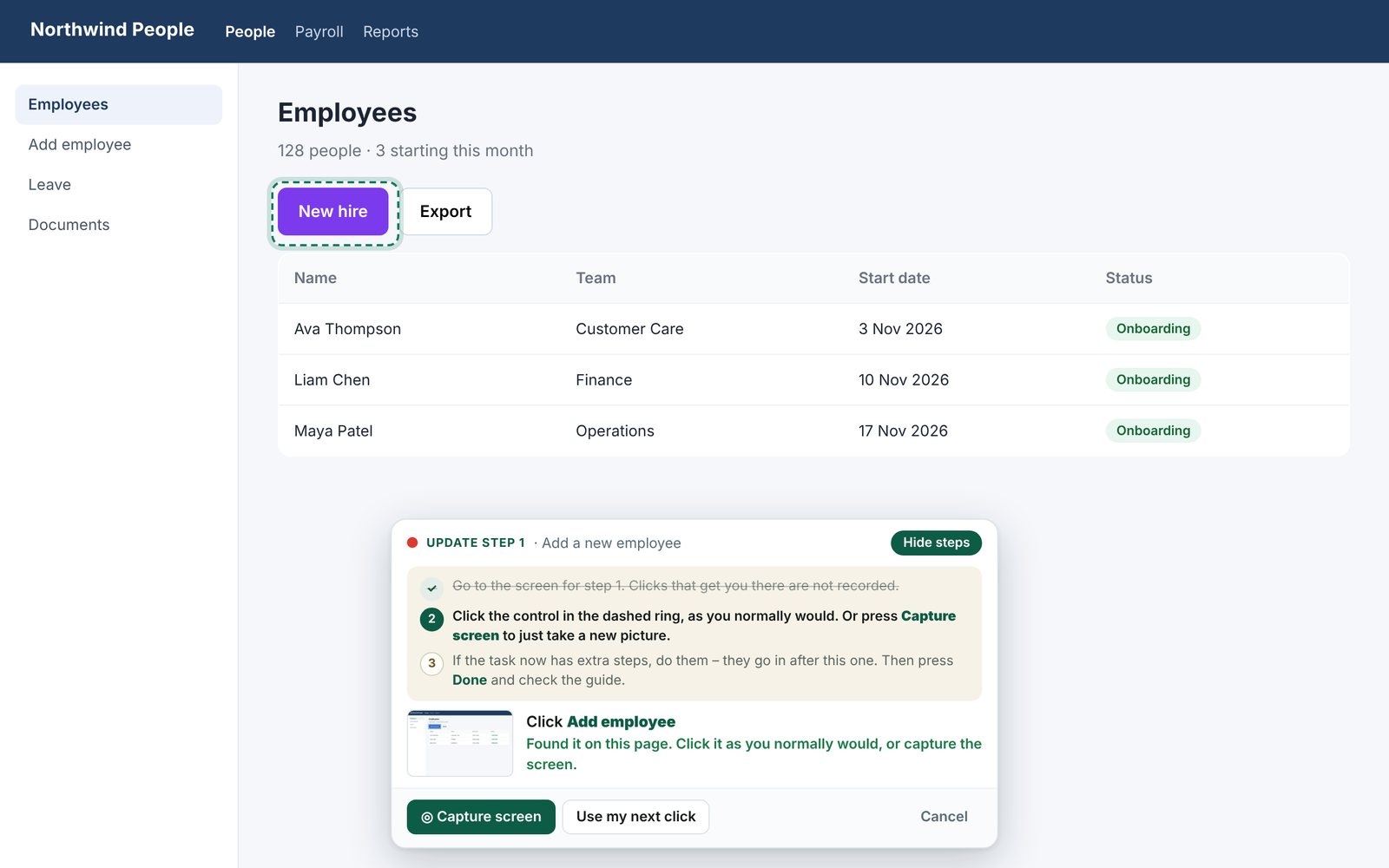
FlowHop's update bar ringing a renamed button with numbered steps

Business

Update every guide at once.

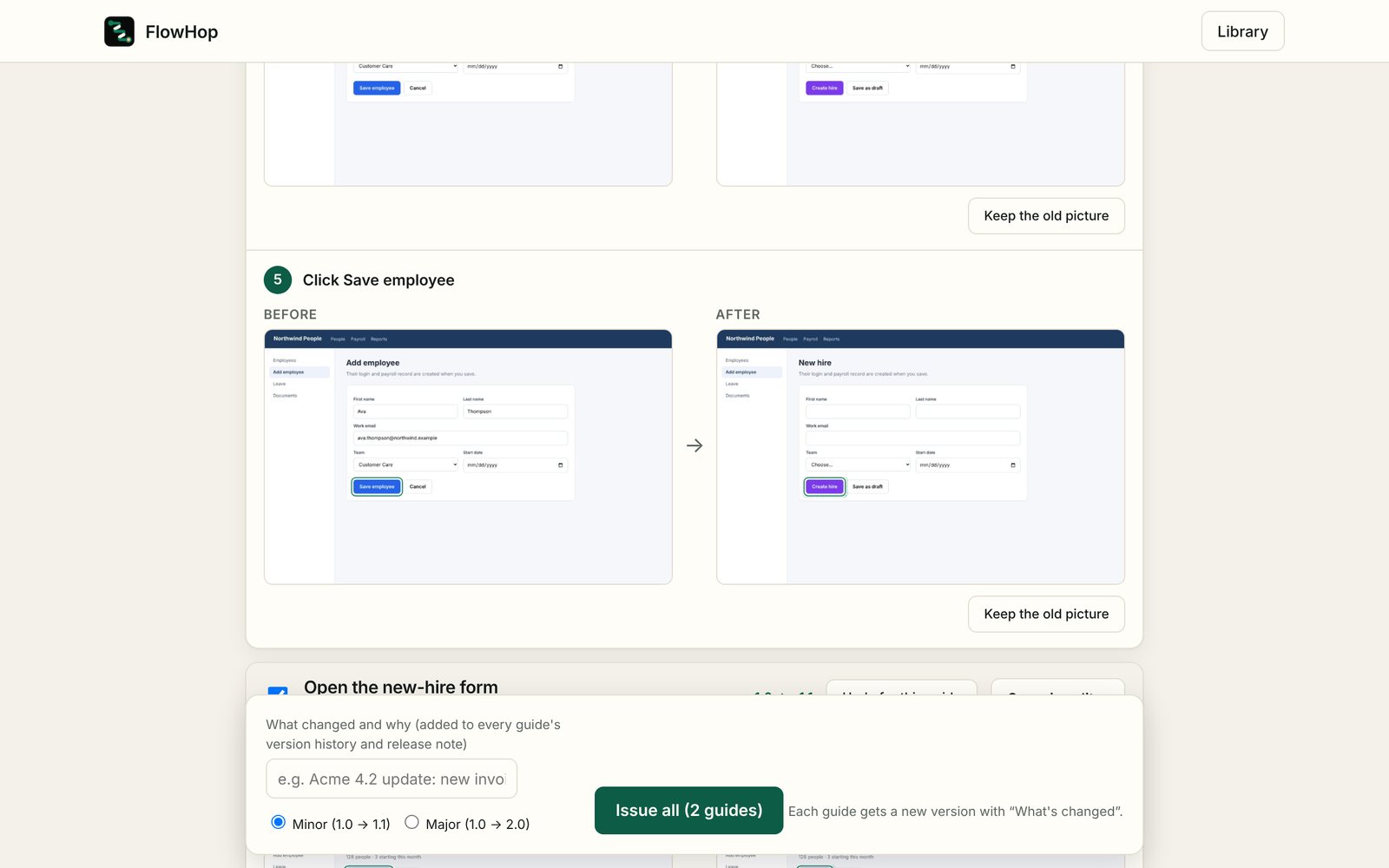
One review page for the whole change: every updated step, before and after, across every guide.

  • Keep the old picture for any step with one click
  • Document IDs, owners, versions and review reminders
  • Broken-step checker flags steps that may no longer match the website
  • Clean screenshots: hide "SIT/UAT" banners and swap test data while recording
Review page showing before and after screenshots for an updated step

Business

Send updates to your workforce as a reel.

Nobody reads a ten-page change notice. Everybody watches a 30-second video.

  • Change reels: before → after, with captions, made on your computer
  • Plays in Teams, email, the intranet or on a phone (MP4 on most computers, otherwise WebM; 16:9 or 9:16)
  • Walkthrough reels and a system overview video for new starters
  • Enablement packs: record several tasks in a row and get one handbook
A real change reel made by FlowHop – 0:19, made on the computer, nothing uploaded. Open the video file (MP4, 0.5 MB).

Business

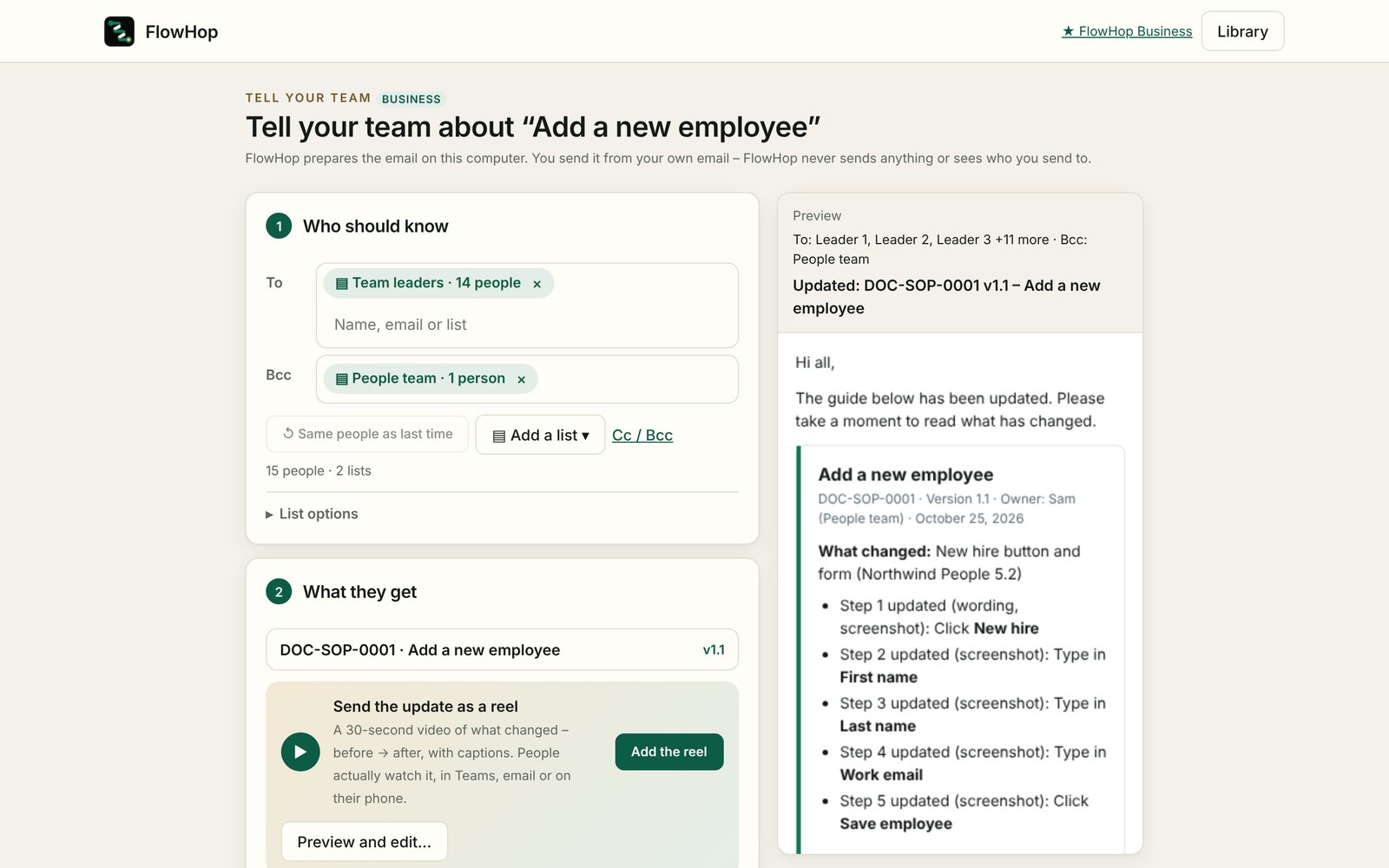
Tell your team in one click.

FlowHop prepares the update email. You send it from your own Outlook or Gmail – FlowHop never sends anything or sees who you send to.

  • Distribution lists, stored encrypted on your computer
  • The guide as a PDF, plus the reel – attached in Outlook drafts, or downloaded ready to add in Gmail and other mail apps
  • A "Confirm you've read this" button linking to your own Microsoft or Google Form – your form records the responses
  • Remembers who you told last time, for the next update
Tell your team: distribution lists, attachments and the email preview

Private by design

  • Guides and screenshots stay on your computer, encrypted
  • There are no FlowHop servers. Nothing is uploaded, shared or sold
  • No account, no analytics, no tracking
  • Works on internal systems and test environments other tools can't see

Only asks for what it needs

  • No "read all your data on all websites" warning at install
  • Records only the tab you choose, only while you're recording
  • Access to all websites is optional and off by default

The only network request is a licence check with our payment provider, ExtensionPay. Privacy policy

Pricing

Recording is free, always. Every install gets 3 free tries of the paid features. Cancel any time – your guides stay on your computer and stay editable.

Free

For anyone who writes the odd how-to

A$0
  • Unlimited recording and editing
  • Automatic blur for passwords and card numbers
  • Web-page download
  • Import guides and follow them with Guide Me

Pro

For people who make and share guides

A$79 / year
or A$9 a month
  • Everything in Free
  • Word, PDF and Markdown with your logo, no FlowHop credit
  • Arrows, boxes, numbers and cover patches
  • Auto-redact emails, phone and account numbers
  • Share guides others can play step by step
  • AI polish and translate in Chrome on supported computers

Business

For training, enablement and ops teams who keep guides current

A$199 / year
or A$24 a month
  • Everything in Pro
  • Update a step in place, and Update all
  • Change reels, walkthrough reels and system overview videos
  • Tell your team: lists, emails, PDF and a "confirm you've read this" button for your own form
  • Document IDs, versions, owners and review reminders
  • Clean screenshots, broken-step checker, enablement packs

Prices per person, in Australian dollars. Payments by ExtensionPay and Stripe. No refunds except where consumer law requires.

Questions

Does FlowHop upload my guides or screenshots?

No. Everything is stored in your own browser, encrypted. FlowHop has no servers. The only thing it contacts is ExtensionPay, to check whether you've bought a plan.

Which websites does it work on?

Almost any web app: HR, finance and CRM systems, intranets, government portals, internal tools and test environments. It can't record browser settings pages or the Chrome Web Store.

What happens when the software changes?

With Business, open the guide and choose Update. FlowHop opens the page and rings the step that needs a new picture. With Update all, capture each changed screen once and every guide that uses it is updated. You review before → after, then issue the new versions.

How do reels work?

FlowHop makes a short video on your computer from the before and after screenshots, with captions. Download it as MP4 (WebM on computers that can't make MP4) and share it in Teams, email or your intranet. Nothing is uploaded.

Does FlowHop send emails for me?

No. It prepares the email and opens it in Outlook, Gmail or your mail app. You check it and press send. Your distribution lists stay on your computer.

Can I hide test-system banners and test data?

Yes (Business). Clean screenshots hide banners such as "UAT" and swap test names or numbers while you record, so guides look like the live system. They only change the picture, never the system itself.

Does FlowHop track who has read an update?

No. FlowHop has no servers, so it can't see who opens or reads your emails or guides. The optional "Confirm you've read this" button links to your own Microsoft or Google Form, and that form records the responses.

Will auto-redact and the broken-step checker catch everything?

They catch the common cases, but neither can guarantee to find every sensitive detail or every change on a website. Always check a guide before you share it – you're responsible for what it shows.

What if I cancel?

Your guides stay on your computer and stay editable. Paid features switch off; recording, editing and web-page downloads keep working.

More help: Learn FlowHop · FlowHop help · [email protected]